Online Screen Recorder: User Guide
Finding recording software that is lightweight, free, and doesn't add watermarks to your videos has always been a frustrating task. Gravador.Net was designed to eliminate this barrier. It is a professional-grade web application that works natively in your browser, without requiring lengthy downloads, complex installations, or account creation.
To deliver superior performance without slowing down your computer, our platform uses WebCodecs technology. In practice, this allows the site to access your machine's hardware acceleration to process media. The result is .MP4 video files and .M4A audio with impeccable quality, ready to be uploaded to YouTube, shared on WhatsApp, or imported into professional video editors.
🔒 100% Local Processing (Your Privacy Guaranteed)
The great advantage of this tool is that no video goes to the internet. All recording and video export is done locally, within your own browser. Whether recording meetings or lessons, feel safe: no data leaves your computer.
1. How to Record PC Screen and Online Meetings
Screen capture is the essential resource for those who create video lessons, record gameplays, or need to document meetings in Google Meet, Zoom, and Microsoft Teams. Knowing that these processes are usually long, we developed a system focused on the security of your data.
The End of Corrupted Videos: Auto-Split System
The greatest risk of recording long videos directly through the browser is the RAM memory limit. If you record two uninterrupted hours, the chances of the browser crashing and you losing all material are very high. To neutralize this problem invisibly, Gravador.Net has Smart Cut (Auto-Split) technology.
Every 10 minutes of recording, our internal engine finishes that video block, saves the file to your local gallery securely, and starts recording the next block in fractions of a second. You won't notice any flickering screens or cuts in your voice. Upon finishing your one-hour meeting, you will have the content saved and divided into organized parts, eliminating the risk of losing hours of work due to a power outage.
Step by Step to Record Your Screen:
- Access the site's top menu and click on the "Screen" tab.
- In the settings panel, activate the Microphone switch if you want to record your own voice during the explanation.
- Click the blue "Record Screen" button.
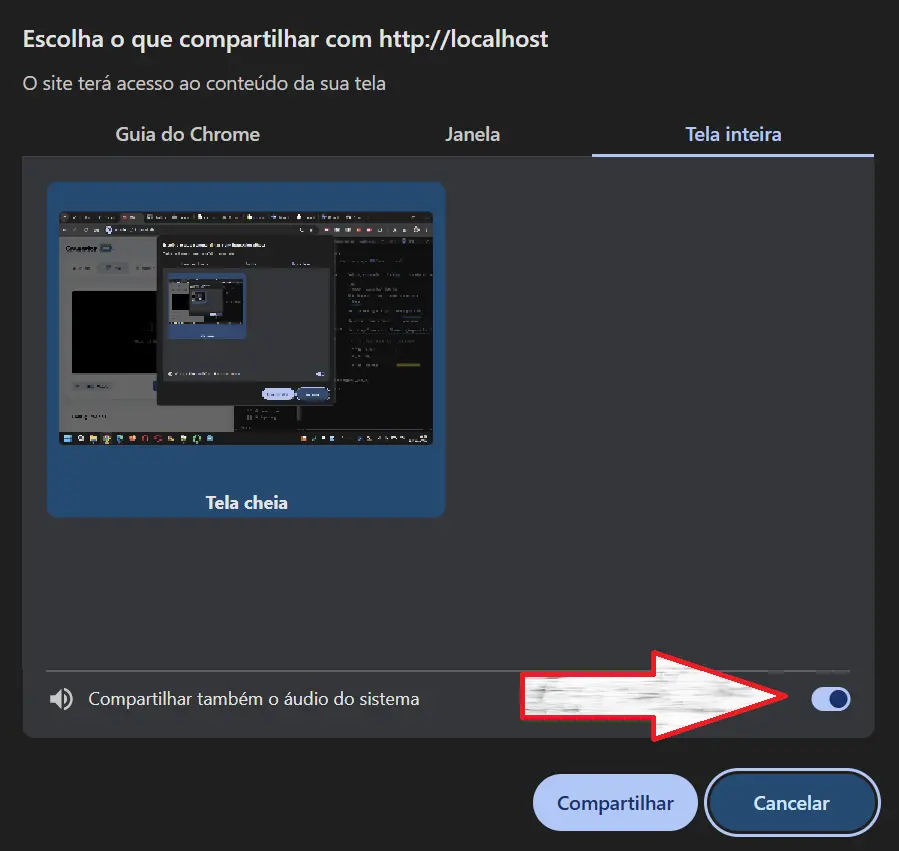
- The browser will open the standard system window asking what you want to capture (a specific browser Tab, a program Window, or the Full Screen of your monitor).
- Make your choice and click share to start the capture.
Maximum Attention: The error everyone makes when recording audio
You know when you finish recording the meeting and realize that only your voice came out in the video, while everyone else was silent? This happens because the microphone does not capture the sound that comes from the computer itself.
To solve this once and for all: at the exact moment the browser window opens asking you to choose which screen to record, STOP AND LOOK at the bottom of that window. You MUST CHECK the box that says "Share system audio" (or Share system audio). If you don't do this, the site won't be able to capture the sounds coming out of your PC (like a YouTube video or the teacher's voice).
2. Voice Recorder: Create High-Fidelity Audio
Whether to start a podcast, record important voice notes, or record a voice-over for a video you are editing, our audio tool delivers professional results without the learning curve of complex editing software.
Music Industry Standard and Visual Feedback
We standardized audio export to .M4A (AAC codec). Widely used by high-quality streaming platforms and Apple devices, this format ensures clean voice capture free of compression noise, generating incredibly lightweight files.
To ensure audio is being captured (and not waste time talking into a muted mic), the tool features a spectrum visualizer. While you speak, the graph responds to your voice frequencies in real-time. And there's more: in your recording gallery, the site automatically generates a visual "cover" showing the exact sound wave pattern (Waveform) of your audio, making file identification easier.
3. WebCam: Practical Filters and Strict Privacy Control
The WebCam function transforms your camera into a content production tool. Unlike a simple recording, the system renders the image on a Canvas, allowing you to apply filters and image adjustments in real-time. The file is already saved with the treated coloring, skipping the color correction stage in editing.
Intelligent Hardware Management (Your light goes out)
Leaving camera permission activated in a browser tab usually creates discomfort. To ensure your peace of mind and save your laptop battery, we implemented Visual Presence Sensors on the site. It works under strict rules:
- If you switch to another browser tab to read a text...
- If you scroll down the page to see your gallery and the camera frame leaves your view...
- Or if the site window is minimized...
The platform cuts the connection with your camera and microphone instantly. Your webcam's indicator light will turn off. The camera is only turned back on when you return to view the tool actively. You have technical guarantee that you are not being monitored accidentally.
Photography Function (Quick Capture)
Found the perfect framing or ideal lighting with our filters? Just click the "Take Photo" button. The system will immediately extract that video frame and download a high-quality PNG image to your computer.
4. Floating Mode (Picture-in-Picture)
The Floating WebCam mode (PiP) is the favorite feature of teachers and content creators. It crops your camera video and turns it into a small borderless window that stays always visible on top of all other windows of your operating system.
How to use in practice?
- Lesson and Lecture Presentation: You can open your slides in full screen in PowerPoint or open a PDF file and position your camera in the corner of the screen, maintaining eye contact with your audience while explaining the material.
- Hybrid Recording (Monitor + Face): A powerful technique is to activate WebCam PiP mode, then return to the site and start Screen Recording. The resulting video will show everything you do on the computer along with your reaction in the corner of the screen. A perfect format for YouTube.
Frequently Asked Questions (FAQ)
Does the site put a watermark on my video?
No! Your videos are 100% clean, as we keep the site online by displaying those ads on the sides.
The only exception is if you use an ad blocker. If the tool detects you are hiding our banners, we mandatorily activate a short 2-second screen at the end of your video promoting the site.
Can I customize this End Screen?
Yes! Those who don't use an ad blocker get free access to the "End Screen". There in the settings, you can choose the background color, put your channel logo, type a thank you message, and even choose music to play automatically at the end of the video.
Why does the site bar say my storage is full?
Videos take up a lot of space on your computer or phone. The browser warns you when your HD space is exceeding 90%. To avoid the risk of the video not being saved, delete old videos from your gallery or free up space on your own phone.
I use Firefox. Why did the tool ask me to wait 30 seconds?
Browsers like Firefox still have certain technical limitations for working with MP4 files in the browser. Because of this, the End Screen animation doesn't work there.
To compensate for this, Firefox users who use ad blockers will receive a "time" penalty, having to wait 30 seconds when finishing the video. To remove this waiting time, just pause the blocker or access the site via Google Chrome/Edge.